
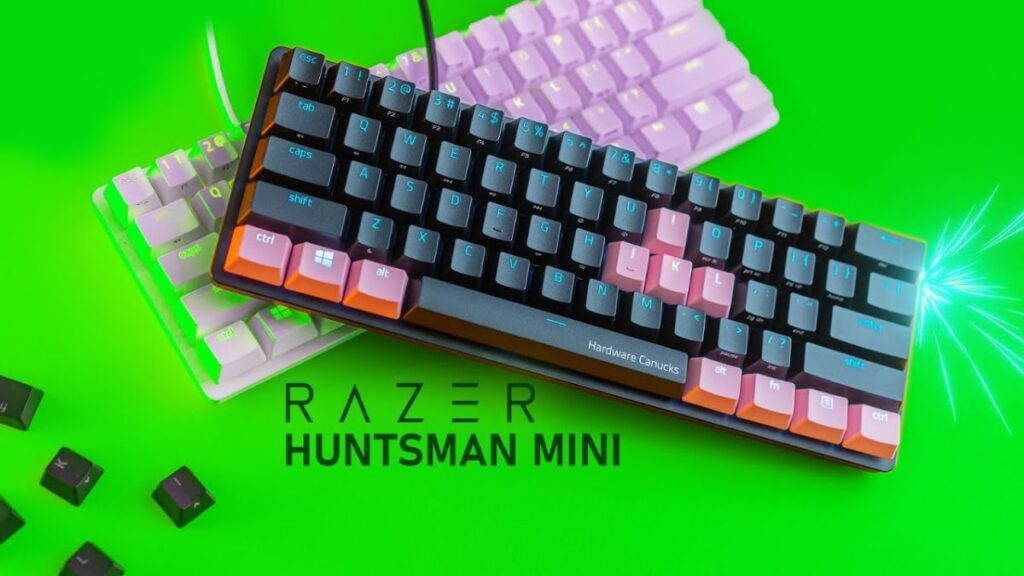

The Razer Huntsman Mini is a compact powerhouse designed for gamers who demand speed, accuracy, and a minimalist setup. Built with Razer’s cutting-edge optical switch technology, this 60% mechanical keyboard delivers ultra-fast actuation, stunning RGB lighting, and a premium aluminum build. Whether you are a competitive esports player, a content creator, or someone who simply loves a clean desk aesthetic, the Razer Huntsman Mini offers performance without compromise. In this detailed review, we will explore its design, switches, performance, gaming experience, typing comfort, RGB customization, software integration, durability, pros and cons, and whether it is worth your investment in 2026.
Compact 60% Design for Maximum Desk Space
The Razer Huntsman Mini features a 60% layout, which means it removes the function row, navigation cluster, and numpad. This compact design is ideal for gamers who need more mouse movement space, especially in fast-paced FPS titles.
Despite its smaller size, the keyboard maintains full functionality through secondary key functions. Using the “Fn” key combinations, users can access arrow keys, media controls, and more. The reduced footprint makes it perfect for minimal desk setups and portable gaming rigs.
For streamers and competitive players who travel frequently, this keyboard easily fits into a backpack without adding bulk. Its compact layout also encourages better ergonomics by allowing a closer mouse-to-keyboard positioning.
Razer Optical Switch Technology Explained
One of the biggest highlights of the Huntsman Mini is its optical switch technology. Unlike traditional mechanical switches that rely on physical contact, optical switches use light-based actuation. This results in faster response times and increased durability.
Razer offers two main optical switch variants:
- Linear Optical Switch (Red) – Smooth and silent keystrokes, ideal for fast gaming.
- Clicky Optical Switch (Purple) – Tactile feedback with an audible click for satisfying typing.
The light-based actuation ensures near-instant key registration, giving competitive players a slight but noticeable edge in reaction-based games.
Gaming Performance and Competitive Edge
When it comes to gaming performance, the Razer Huntsman Mini truly shines. The keyboard features an 8000Hz polling rate in newer variants, which significantly reduces input latency.
In FPS games like Valorant, Call of Duty, and CS2, every millisecond matters. The optical switches provide faster response times compared to traditional mechanical keyboards.
The compact size also allows for lower mouse sensitivity players to have more room for wide arm movements, making it especially useful for competitive shooters.
Premium Aluminum Build Quality
The Razer Huntsman Mini is built with a sturdy aluminum top plate that feels solid and premium. Unlike plastic keyboards that flex under pressure, this keyboard remains firm during intense gaming sessions.
The double-shot PBT keycaps are another standout feature. They are more durable than standard ABS keycaps and resist shine even after extended use. The textured surface provides a comfortable grip for both gaming and typing.
RGB Lighting and Customization
Razer is known for its vibrant RGB lighting, and the Razer Huntsman Mini does not disappoint. Powered by Razer Chroma RGB, the keyboard supports millions of colors and dynamic lighting effects.
You can synchronize lighting with other Razer devices through Razer Synapse. This allows you to create custom profiles, reactive lighting effects, and game-integrated animations.
The per-key RGB illumination ensures that even in dark environments, every key remains clearly visible.
Razer Synapse Software Integration
The Razer Huntsman Mini fully integrates with Razer Synapse, giving users control over:
- Key remapping
- Macro recording
- RGB lighting customization
- Profile storage
- Gaming mode adjustments
Onboard memory allows you to save up to five profiles directly on the keyboard, meaning you can use custom settings even without installing the software on another PC.
Typing Experience and Everyday Use
While primarily designed for gaming, the Razer Huntsman Mini performs impressively for typing as well. The linear switches provide a smooth keystroke without tactile bumps, making them ideal for fast typists.
The clicky version offers a satisfying tactile response, though it may be louder for shared office environments.
Due to its compact layout, there may be a learning curve for users accustomed to full-sized keyboards. However, once adapted, many users prefer the efficiency of the 60% format.
Portability and Detachable USB-C Cable
The detachable USB-C cable adds convenience for portability. Unlike permanently attached cables, you can easily remove it for travel or replace it if damaged.
This feature is especially useful for esports players who carry their gear to tournaments and LAN events.
Durability and Longevity
Razer claims that its optical switches are rated for up to 100 million keystrokes. Since there is no metal contact required for actuation, wear and tear are significantly reduced.
The PBT keycaps also enhance longevity, ensuring the legends never fade even after years of heavy use.
Minimalist 60% Layout: Small Size, Big Performance
The Razer Huntsman Mini features a 60% layout, which removes the function row, number pad, and dedicated navigation keys. While this may seem limiting at first, it provides significant benefits:
- More mouse movement space
- Cleaner and minimalist desk setup
- Easier portability
- Improved ergonomic positioning
Competitive FPS players especially benefit from the extra mouse room. Lower DPI gamers who rely on wide arm movements will notice the difference immediately.
The keyboard keeps essential functions accessible through secondary key combinations. Using the Fn key, you can access arrow keys, media controls, brightness settings, and macros.
Optical Switch Technology: Speed Redefined
One of the standout features of the Razer Huntsman Mini is its optical switch system. Unlike traditional mechanical switches that require metal contact, optical switches use a beam of light to register keystrokes.
This results in:
- Faster actuation
- Lower debounce delay
- Longer lifespan
- More consistent performance
Razer offers two main optical switch options:
Linear Optical (Red Switch)
- Smooth and silent
- 1.0mm actuation point
- Ideal for fast-paced gaming
Clicky Optical (Purple Switch)
- Tactile bump with audible click
- 1.5mm actuation
- Better for typing enthusiasts
The reduced actuation distance gives gamers a measurable advantage in reaction-based games.
Gaming Performance: Built for Competitive Play
The Razer Huntsman Mini is built for serious gaming. With a high polling rate (up to 8000Hz in updated models), the keyboard reduces input delay to almost zero.
In games like:
- Valorant
- CS2
- Apex Legends
- Fortnite
Every millisecond counts. The Razer Huntsman Mini ensures your inputs register instantly.
The compact size also allows for a centered posture, reducing strain during long gaming sessions.
Premium Aluminum Build and PBT Keycaps
Razer uses a matte aluminum top plate that provides a solid and premium feel. The keyboard does not flex under pressure, even during aggressive gaming.
The double-shot PBT keycaps are textured and highly durable. Unlike ABS keycaps, they resist shine and fading. This ensures long-term usability even after millions of keystrokes.
The legends are crisp, clear, and allow RGB lighting to shine beautifully through them.
Razer Chroma RGB: Immersive Lighting Experience
The Razer Huntsman Mini supports per-key RGB lighting powered by Razer Chroma. With millions of color options and multiple lighting effects, you can personalize your setup fully.
Through Razer Synapse, you can:
- Create custom lighting profiles
- Sync with other Razer devices
- Enable reactive lighting effects
- Integrate lighting with supported games
Popular titles can trigger dynamic lighting effects during gameplay, making the experience more immersive.
Onboard Memory and Custom Profiles
The keyboard includes onboard memory, allowing users to save up to five profiles directly on the device. This is extremely useful for:
- LAN tournaments
- Gaming cafes
- Switching between work and gaming setups
Even without installing Razer Synapse on another PC, your custom settings remain intact.
Typing Experience: Is It Good for Work?
While designed primarily for gaming, the Razer Huntsman Mini is also suitable for typing.
Linear Version for Typing
- Smooth and effortless
- Quiet operation
- Great for fast typists
Clicky Version for Typing
- Strong tactile feedback
- Satisfying click sound
- Better typing accuracy
However, users coming from full-size keyboards may need time to adjust to the missing arrow keys and function row.
Portability and Travel-Friendly Design
The detachable USB-C cable makes the Huntsman Mini perfect for travel. You can easily pack it into a laptop bag or backpack.
This makes it popular among:
- Esports players
- Students
- Digital nomads
- Streamers
The braided USB-C cable is durable and resistant to wear.
Durability and Longevity
Razer rates the optical switches for up to 100 million keystrokes. Because there is no metal-to-metal contact, the switches experience less physical wear.
The aluminum frame, strong keycaps, and high-quality PCB ensure long-term reliability.
Comparison with Other 60% Keyboards
When compared to competitors like:
- Ducky One 2 Mini
- Anne Pro 2
The Huntsman Mini stands out due to:
- Optical switch speed
- Premium build quality
- Strong software ecosystem
- Higher polling rate
While some competitors offer wireless connectivity, the Huntsman Mini focuses on pure wired performance for minimal latency.
Sound Profile and Acoustics
The linear optical switches produce a clean and smooth sound without excessive rattle. The clicky version has a noticeable sharp click.
The keyboard has minimal stabilizer noise, which enhances the typing experience. However, users who prefer silent setups may prefer the linear version.
Customization Options
Although the Huntsman Mini is not a fully hot-swappable keyboard, users can still customize:
- Keycaps (standard bottom row)
- Lighting effects
- Macros
- Function layers
Custom keycap sets can dramatically change the appearance of the keyboard.
Pros and Cons
Pros
- Extremely fast optical switches
- Compact and travel-friendly
- Durable PBT keycaps
- Premium aluminum construction
Comparison with Other 60% Keyboards
Compared to competitors like the Ducky One 2 Mini or Anne Pro 2, the Razer Huntsman Mini stands out due to:
- Optical switch speed
- Premium aluminum construction
- Advanced RGB integration
- 8000Hz polling rate
While it may be slightly more expensive, the added performance justifies the price for serious gamers.
Pros and Cons
Pros:
- Ultra-fast optical switches
- Compact and portable design
- Durable PBT keycaps
- Stunning RGB lighting
- Premium aluminum build
Cons:
- No dedicated arrow keys
- Learning curve for 60% layout
- Premium pricing
Who Should Buy the Razer Huntsman Mini?
This keyboard is perfect for:
- Competitive FPS gamers
- Minimalist desk enthusiasts
- Streamers and esports players
- Users who prefer compact keyboards
If you need a numpad for heavy data entry, you may want to consider a full-sized alternative. However, for gaming-focused setups, the Huntsman Mini is one of the best options available.
Final Verdict: Is It Worth Buying in 2026?
The Razer Huntsman Mini continues to be one of the top 60% gaming keyboards on the market. Its optical switches provide unmatched speed, the aluminum build ensures durability, and Razer Chroma RGB adds stunning visual appeal.
Although it comes at a premium price, the performance and build quality make it a worthwhile investment for serious gamers. If you value speed, portability, and aesthetics, the Razer Huntsman Mini remains a top-tier choice in 2026.